Inviting external providers
Written By Talia Livio
Last updated 9 months ago
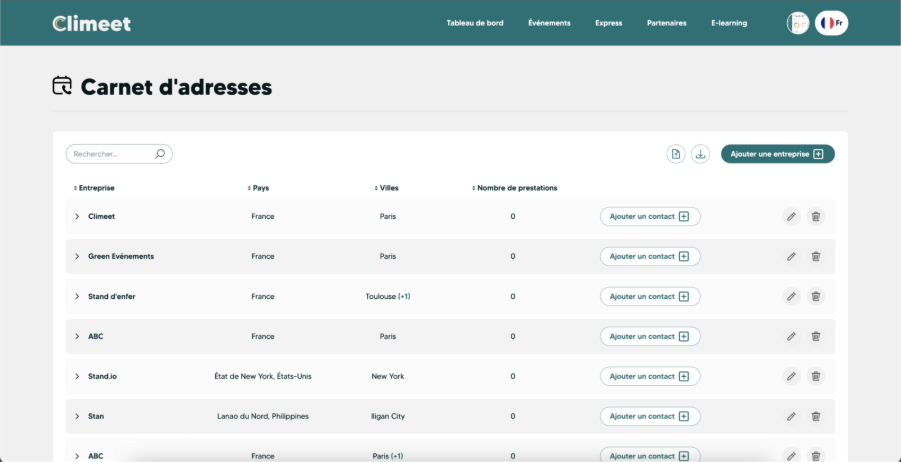
The first step is for the organizer to create the service provider in the address book. This address book centralizes contacts and makes it easy to reuse the same service provider for multiple events. Once the service provider is registered, the organizer can invite them to contribute to a scenario related to an event.
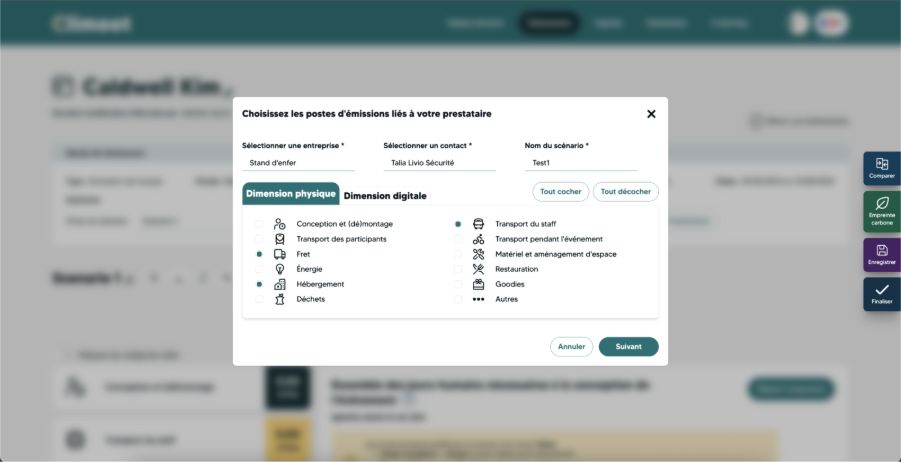
When the invitation is sent, a window opens to specify several essential pieces of information. The organizer must indicate the company to which the service provider belongs, their name, and their profession, for example, security, agency, caterer, or other type of service. The choice of profession is particularly important, as it determines the emission sources that will be associated with the service provider. Depending on the profession, the data requested will vary, allowing the collection to be adapted to the reality of each type of service.
Once this information has been entered, an invitation is sent by email to the service provider. This message invites them to create a "Provider" account on Climeet. This account gives them access to a dedicated space where they can view the scenarios assigned to them.
After creating their account, the service provider can log in and access the scenario associated with the event. They enter data related to their service, such as transportation, energy, or equipment information, depending on the items assigned to them. The form is structured in such a way as to guide data entry and remain understandable, even for users who are not experts in carbon calculation.
Once the information has been completed, the service provider submits their completed scenario. The data is then integrated into the overall carbon calculation for the event. The organizer can track the progress of each service provider and view the information provided to obtain a more complete and reliable estimate of the carbon footprint.
Was this helpful?
Still need help? Share an idea